Storko Product Health Scanner
Find the product images and catalogue-data issues that quietly cost you Google Shopping visibility — before Merchant Center does.
 In Shopify App Store reviewDesigned, built and submitted by Keith Pillay
The problem
Google Merchant Center enforces a 500×500 px minimum for product images, and rejects what falls short. Most merchants only find out after products have already been disapproved, because Shopify's admin doesn't surface exact image dimensions across a whole catalogue.
What it does
- Scans every product image and flags those under Google's 500×500 px minimum, with exact per-image sizes.
- Catalogue-data checks alongside image checks, rolled up into a single health score.
- Clear explanation and suggested fix for every flagged item.
- Supplier-ready CSV exports grouped by vendor, so fixes can be handed straight to the right person.
- Automatic monitoring so new problems are caught as the catalogue changes.
- Read-only access to the store, and data wiped when the app is uninstalled.
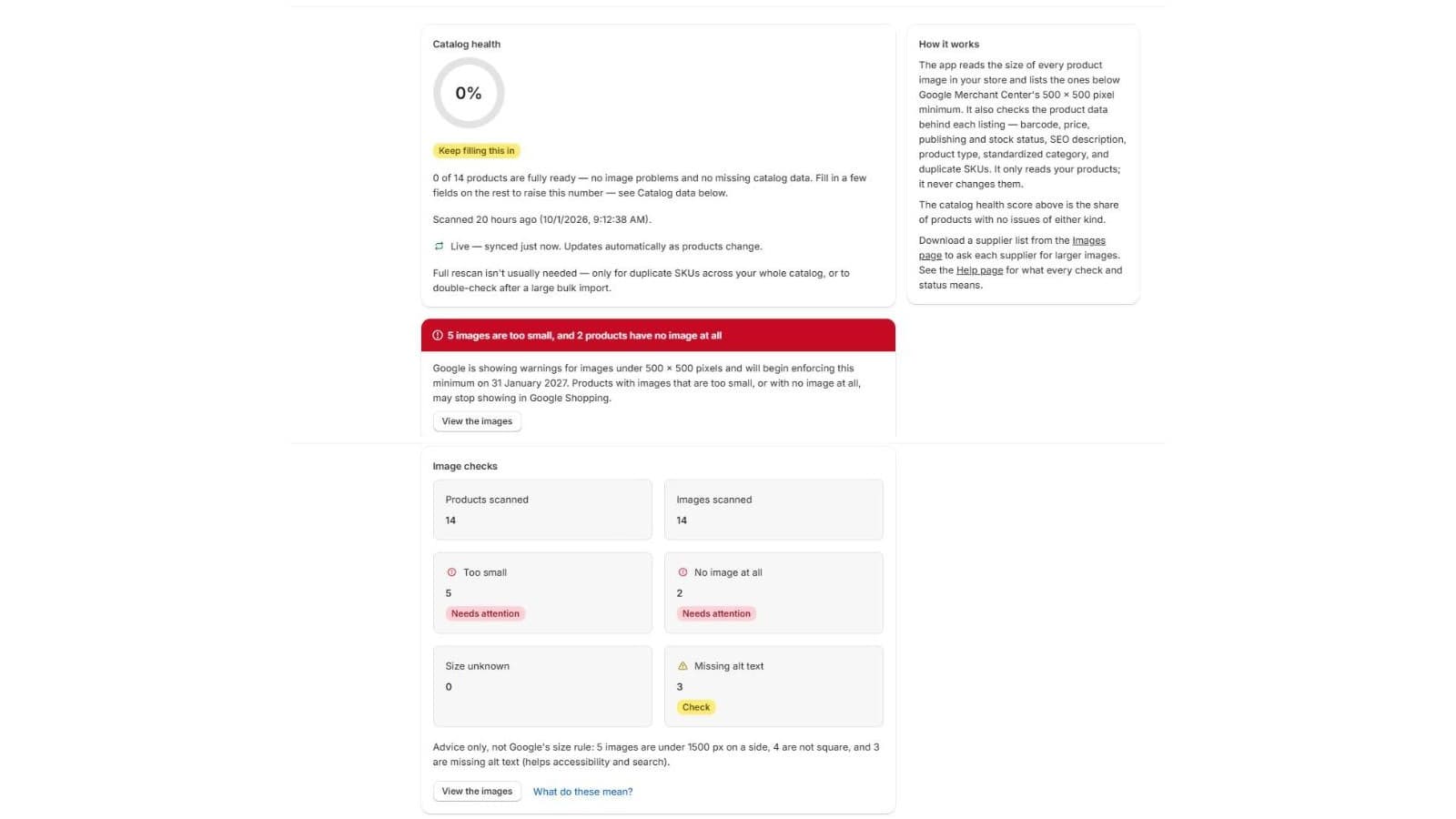
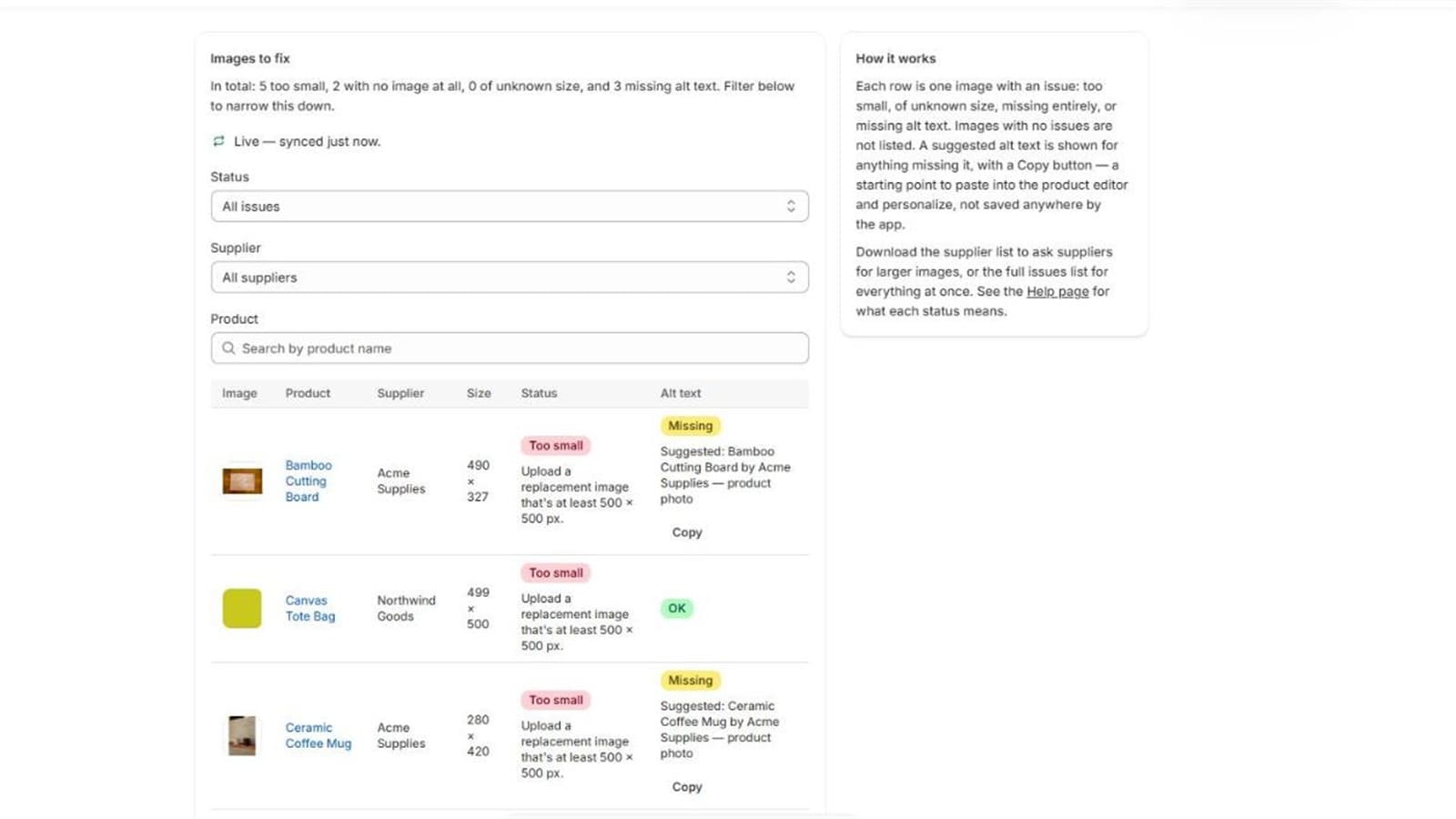
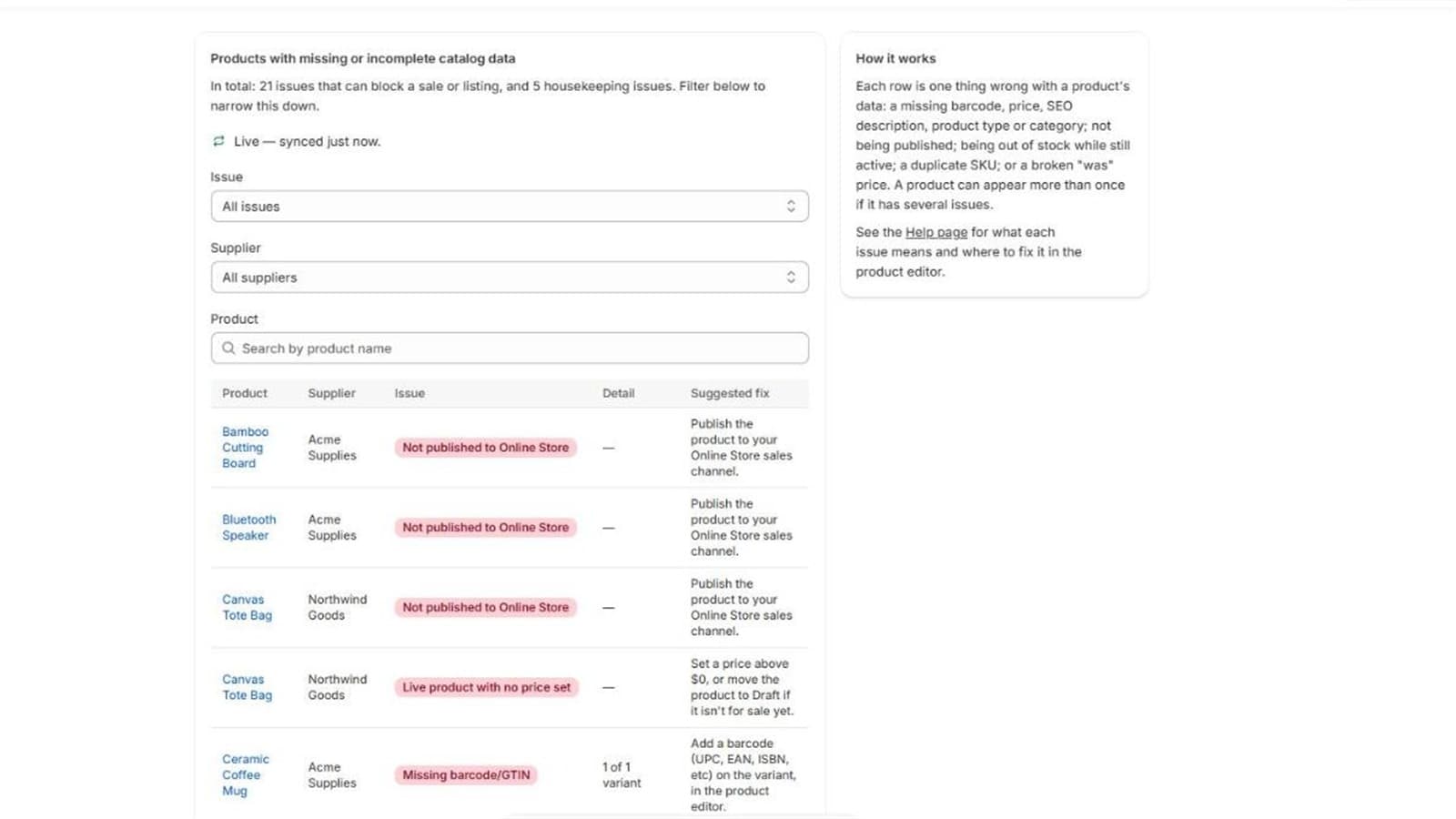
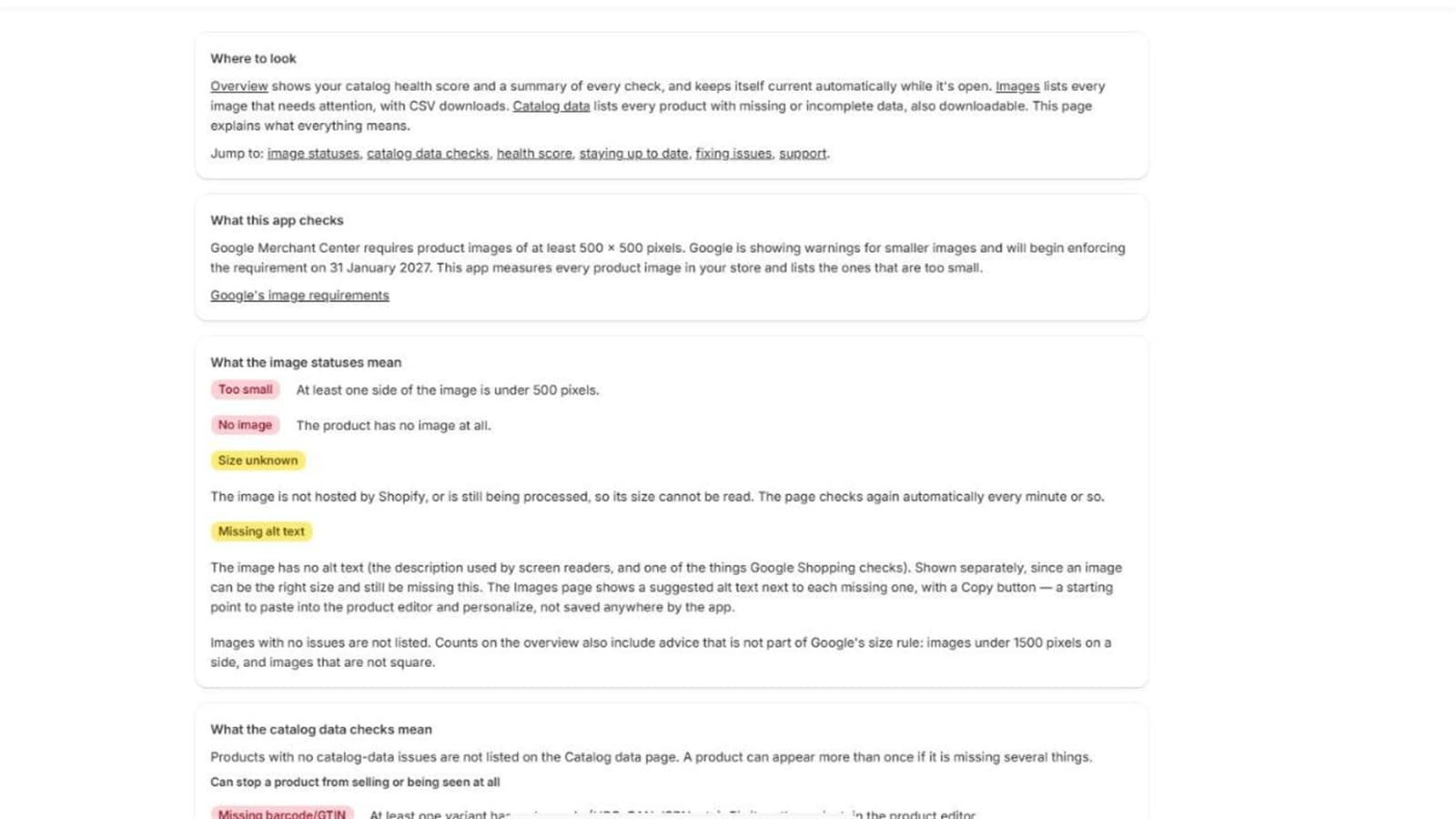
Screenshots are from a development store with test data.
- 36.3s
- real scan of 6,013 products
- 100,000
- products in the synthetic scale test
- 182 + 37
- unit tests + integration/scale tests
- 1
- scope requested: read_products
How I built it, step by step
From the first idea to App Store submission: the decisions, the mistakes and what each one taught me.
- 01
Find a gap and check it honestly
From 31 January 2027, Google Merchant Center enforces a 500×500 px minimum on every product image. Shopify's admin shows the image but not its pixel size, so across hundreds or thousands of products nobody can see which ones fall short.
Before writing any code I checked the market and tried not to flatter myself: the exact niche looked empty, but the neighbourhood was crowded and demand was unproven. That shaped the plan: a free scan first, and an app treated as a learning vehicle before an income source.
I weighed about fifteen ideas and picked this one because it is safe (read-only, no customer data), objective (an image is either 480 px wide or it isn't), has a deadline that gives merchants a reason to act, and exercises the whole chain: API design, scale, webhooks, privacy and review.
- 02
Choose the stack
I started from Shopify's official React Router app template with Polaris web components for the UI, and Prisma for the data layer: SQLite in development, Postgres on Neon for integration tests and production.
Everything talks to the Admin GraphQL API, which is also the current requirement for new public apps. The only scope requested is read_products. Production runs on Google Cloud Run.
- 03
Build one scan path that works at every size
Paging through GraphQL works for small stores and falls apart for big ones because of query cost and rate limits. I used Shopify bulk operations for the full scan at every size, so there is exactly one implementation to test.
The result arrives as a JSONL file that I stream line by line, never loading it whole. That is what lets a 6,013-product store scan in about 36 seconds, and a synthetic 100,000-product catalogue run with roughly 49 MB of memory growth.
- 04
Fix the bug that hid 500 rows
My first scale test reported correct totals but stored only 7 of 507 failing images. Shopify reuses one media ID for every product that uses the same file: 1,015 image entries had only 15 unique IDs, and I was keying results by media ID alone, so rows silently overwrote each other.
The fix was a composite key of shop, product and media ID. The real lessons: never trust an ID to be unique across more than you've verified, assert that stored rows equal scan totals, and test with duplicated IDs, not just clean ones.
- 05
Keep results current without rescanning
The app subscribes to product create, update and delete webhooks. The handler does almost nothing: verify the signature, then write one row into a queue table. A separate manager drains the queue in batches of up to 200, fetching all the products in one GraphQL call and writing all results in one transaction.
Batching the writes took a 200-item batch from over a minute to about 17 seconds. An item that fails five times moves to a dead-letter table instead of retrying forever or vanishing.
- 06
Go beyond images
After the first version I added checks for the catalogue data Google Shopping cares about (missing barcodes, prices, SEO descriptions) and rolled everything into a single health score with a plain-language fix for each flagged item.
Results are reported honestly as pass, fail or unknown rather than guessing, and CSV exports are grouped by vendor so fixes can go straight to the right supplier.
- 07
Secure it and test it at scale
Shopify access tokens are encrypted at rest with AES-256-GCM, with the key kept outside the database. It isn't required for an app that never touches customer data, but a plaintext token gives direct API access to a whole store, so it was cheap insurance.
At submission the suite ran 182 unit tests and 37 integration and scale tests, including tests against a real Postgres database. I mutation-tested on purpose (changing < to <=, removing a guard) to prove the tests catch real faults, and I tested the real pipeline against 100,000 synthetic products.
- 08
Catch what automated checks miss
Two embedded-UI traps cost me time because every automated check stayed green. Importing a .server module into component code broke the browser bundle and left an endless spinner. And React 18 doesn't turn custom-element event props into listeners, so the Polaris table's pager did nothing.
Now I run a build and load the page after every route change, and treat every handler on a custom element as unproven until I've clicked it in the real frame.
- 09
Audit against the App Store requirements
I re-read Shopify's primary sources instead of trusting summaries, then audited the code itself: GraphQL only (no REST), session tokens with no cookies or local storage, immediate authentication on install and reinstall, the three mandatory privacy webhooks with 401 on invalid signatures, the current API version, and minimal scopes.
The most useful finding was the app name. Requirement 4.1.2 says the name must lead with your distinctive brand. My working title, Image Size Checker, had none, so it became Storko, and later Storko Product Health Scanner once the scope grew beyond images.
- 10
Submit: listing, privacy policy and reviewer instructions
Listing images had to show real, distinct screens with no browser chrome. I rebuilt mine after stretched crops turned the circular health score into an oval, then checked each at 3× zoom. The privacy policy, published on this site, was checked against Shopify's recommended disclosures and updated twice.
I wrote step-by-step reviewer instructions (install, watch the first scan, edit a product and see the change picked up, test an empty store, uninstall and reinstall) and a narration script for the screencast. The app is now submitted and in review.
Tech stack
- Shopify's official React Router app template with Polaris web components.
- Shopify Admin GraphQL API, including bulk operations to read media for large catalogues.
- Webhook handling for lifecycle events, including data deletion on uninstall.
- Prisma with a database layer, plus automated unit and integration tests and a scale test across 1,000+ products.
- Built to Shopify's App Store requirements and submitted for review.
- Postgres on Neon, hosted on Google Cloud Run, with Sentry for error monitoring.
- Access tokens encrypted at rest with AES-256-GCM.
Hiring a senior Shopify developer?
I'm open to remote roles worldwide. Send a message and I'll reply within a day.
CV on request via WhatsApp, or email me.